Put the right technician on every job and keep every maintenance visit on schedule.
Dispatch happens on a whiteboard and a round of phone calls, the technician calls back for the address and the equipment history, agreement visits are tracked in a spreadsheet someone has to remember to open, and the paperwork comes back days after the job. We set up a dispatch calendar by technician, work orders that carry the site, the history and the checklist, agreement visits that create themselves on schedule, and a phone screen built for the person doing the work.
- The week's work orders on one dispatch calendar
- Agreement visits created automatically
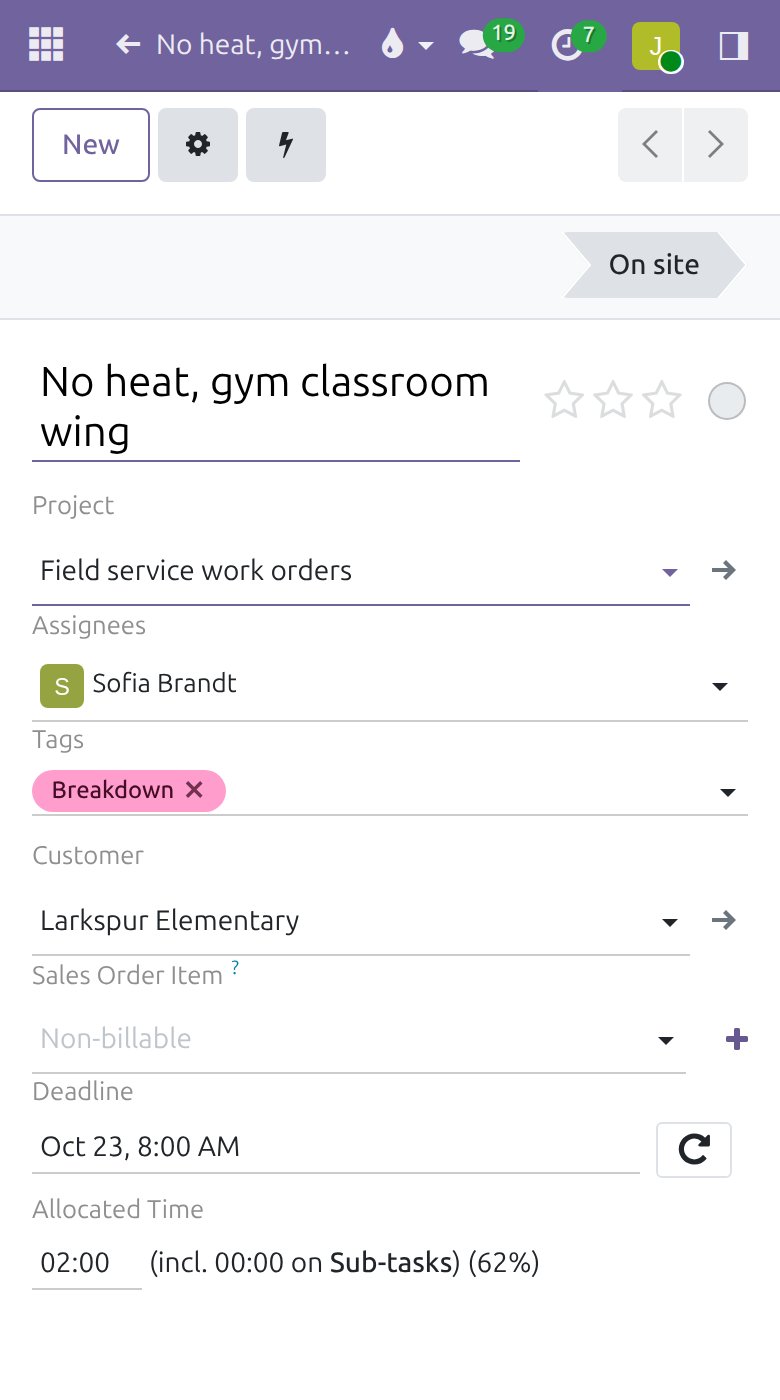
- The work order on the technician's phone

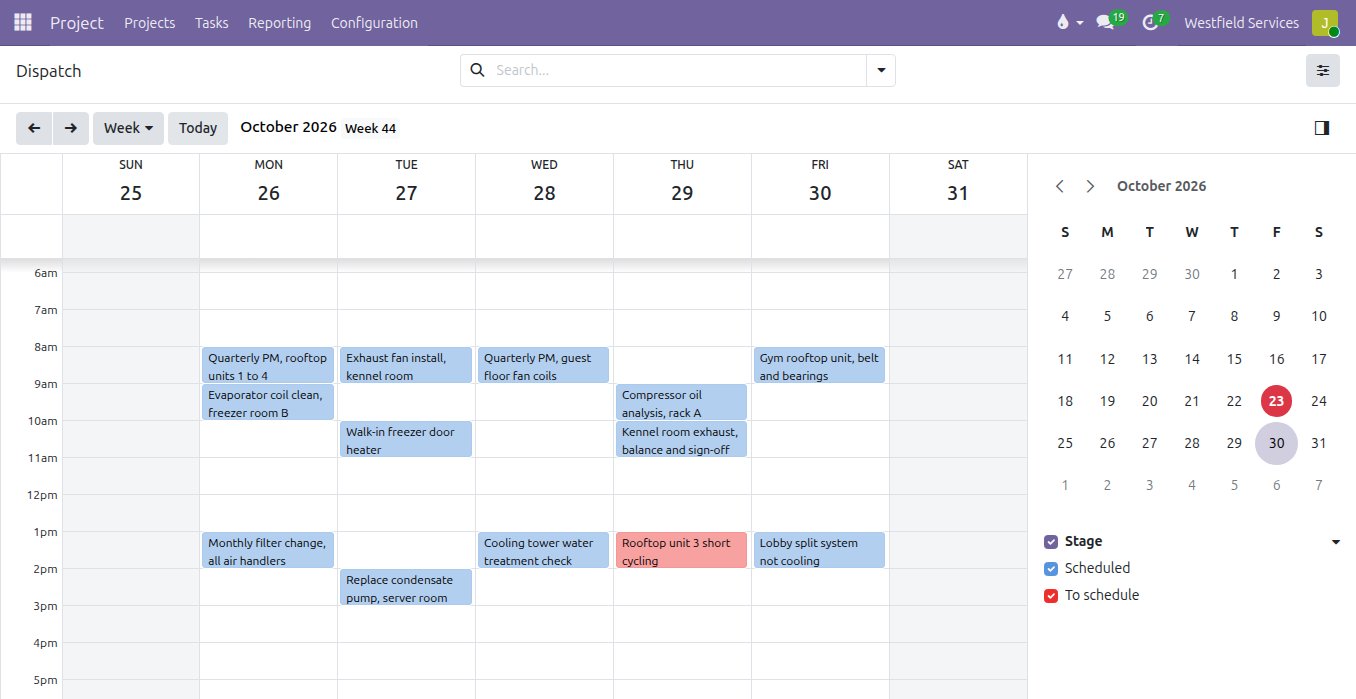
See the whole week of work orders by technician, and move a job when the day changes without a round of phone calls.
A breakdown comes in, a technician runs long, a customer cancels, and the whiteboard is out of date within the hour. Every work order sits on a dispatch calendar with its customer, its technician and its time, coloured by where it stands, from waiting to be scheduled to done. Dragging a job to another slot moves it at once, reassigning it puts it on the other technician's day, the jobs nobody has taken yet stand out, and each technician's day can be laid out as a route of stops in order.
- A dispatch calendar by day, week and technician
- Jobs moved by dragging and reassigned in a click
- Unscheduled work orders in their own colour
- Each technician's day as an ordered route of stops
Send every job out with the site, the history and the checklist, and get it back with the hours, the parts and the customer's signature.
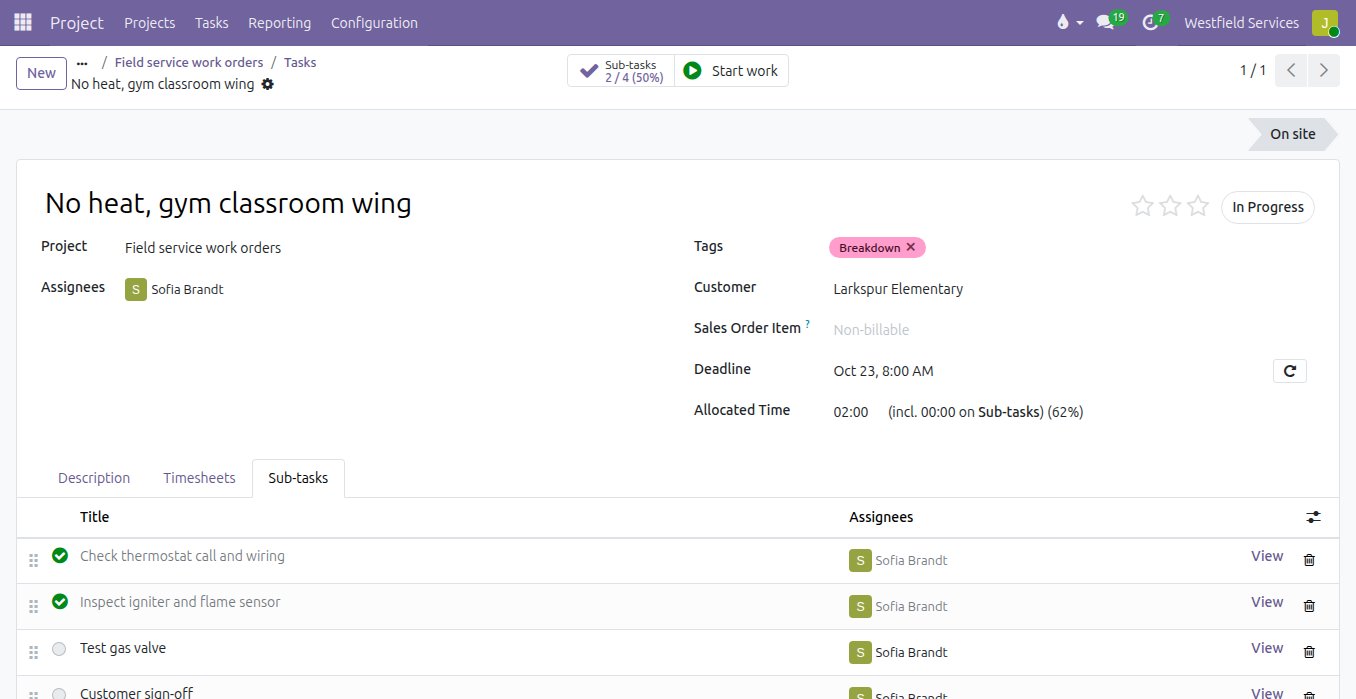
A work order that says "no heat, call the school" sends a technician out to rediscover what the last one already knew. Each work order carries the location with its access notes, the equipment and what was done to it before, and the checklist for that kind of visit. The technician ticks off the steps, records the hours and the parts from the truck, and has the customer sign on the screen, so the work order comes back complete and ready to invoice the same day.
- The location, its access notes and its equipment on the work order
- A checklist per type of visit, ticked off on site
- Hours and parts recorded against the job
- The customer's signature captured before the job is closed
Sell the maintenance agreement once, and let every visit it promises schedule itself and every fee invoice itself.
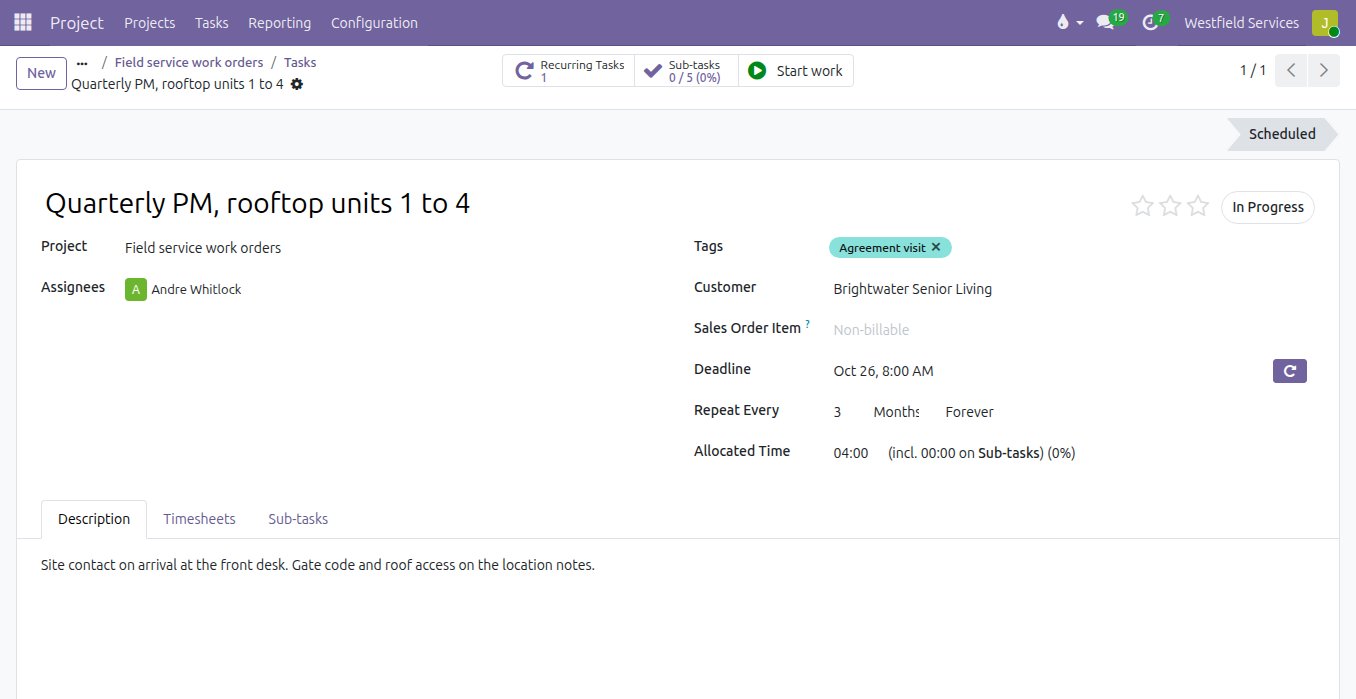
Maintenance agreements are the steadiest revenue a service company has, and the easiest to lose when a quarterly visit slips because nobody looked at the spreadsheet. The agreement is sold on a quote like anything else. Its visits are recurring work orders on the frequency it promises, monthly, quarterly or twice a year, created ahead of time so dispatch can plan around them, and its fee is invoiced on schedule. Each visit is linked to its agreement, so you can see what an agreement earns against what it costs to serve, and renew it with the numbers in front of you.
- Recurring work orders on the agreement's own frequency
- Agreement fees invoiced monthly, quarterly or yearly
- Every visit linked to the agreement it belongs to
- Revenue against cost to serve when it comes up for renewal
Give technicians a phone screen that shows their jobs, the address and what to do, and nothing else they have to learn.
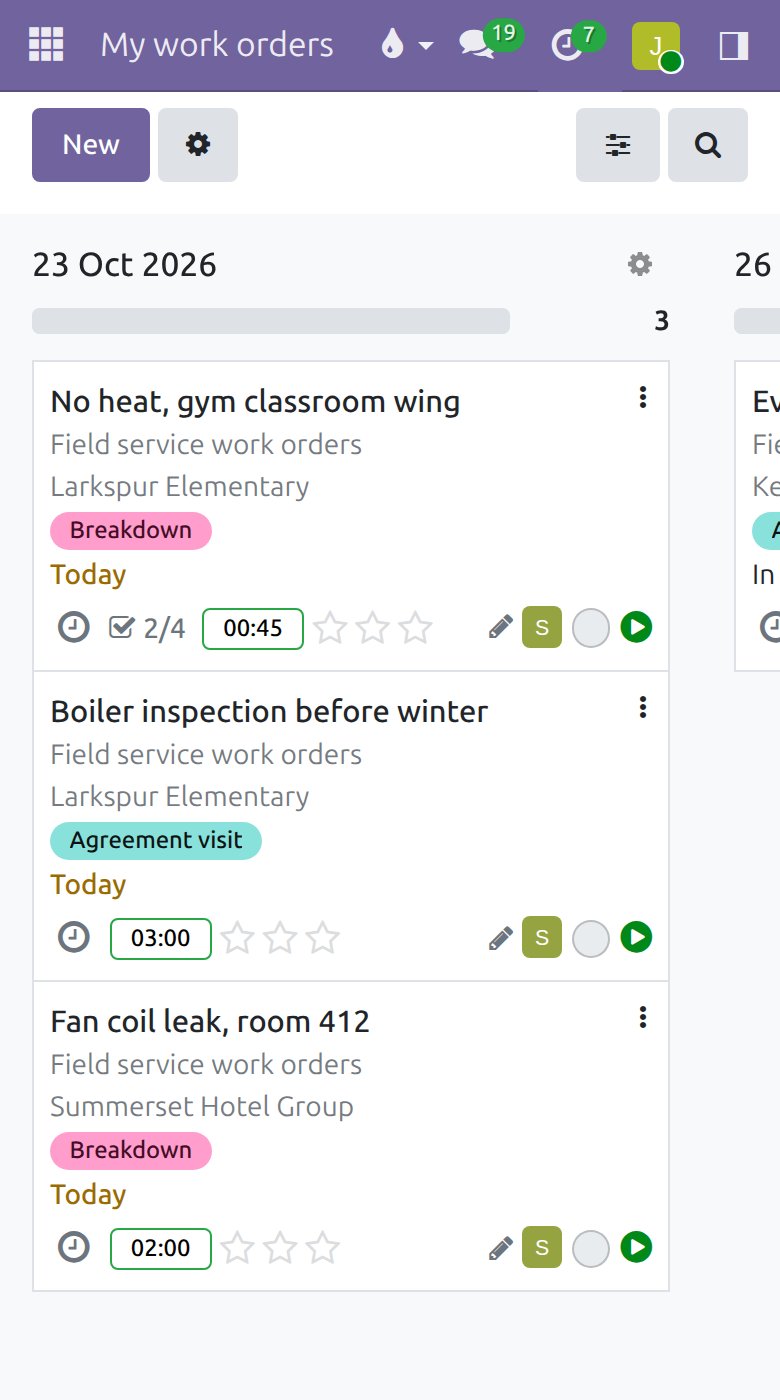
Technicians did not take the job to fill in software, and a screen built for the office gets ignored in the field. On the phone they see their own work orders by day, open one to get the site, the notes and the checklist, start the timer when they arrive and stop it when they leave. Anything they would rather say than type, like a part used or a note for the next visit, can be texted to the assistant and lands on the record.
- Each technician's own jobs, by day
- The site, the notes and the checklist one tap away
- A start and stop timer on the job
- Notes and parts texted in and filed on the record
The apps and add-ons we would set up for a field service company.
The field service modules of the Odoo Community Association on Odoo Community, with our own add-on for the people in the field.
Field Service
Work orders, service locations, technicians and equipment, with stages from scheduled to done.
Field Service Recurring Work Orders
Agreement visits created on the frequency each agreement promises, ahead of time.
Field Service - Agreements
Every work order linked to its agreement, so you can see what each agreement costs to serve.
Recurring - Contracts Management
Agreement fees invoiced on schedule, monthly, quarterly or yearly.
Field Service - Sales
A visit or an install sold on a quote creates its work order when the customer signs.
OCA moduleField Service - Stock
Parts and equipment moved to and from the job site through your stock.
Field Service Route
Each technician's day as an ordered route of stops.
Field Service - Sign
The customer's signature captured on the work order before it is closed.
Adomi Agent
Technicians text a note or a part used, and it is filed on the right record.
Related
Project management
Every job on schedule and on budget, on a board the whole team works from.
See projectsTime and materials
A timer on the task, parts booked as used, and the invoice for both in one click.
See time and materialsCustomer portals
Customers sign quotes, pay invoices and check on jobs themselves.
See customer portalsThe assistant you text
Run the day from your phone: text a to-do, a receipt or a quote and it lands in the system.
See the assistantOther industries we set up
Software as a Service
Billing, books, logins, support and email behind your product, set up and connected.
See how we helpConstruction
Estimates, job costing, subcontractors, progress billing.
See how we helpManufacturing
Real lead times, known costs before you build, dates you can keep.
See how we helpWholesale and distribution
Purchasing, warehouses, deliveries, invoicing.
See how we helpSchedule a demo.
Tell us a little about your business and what you would like to see. We walk you through how this would work for a company like yours, at a time that suits you. The first conversation is free.